Convocation photos in a day: how colleges can get every graduate their stage photo
Thousands of graduates, one QR code on the stage screen, a selfie, a UPI payment, and the full-size original ready to download by the next evening. Here's how to run it, and how a student photography club can run it as a fundraiser.
6 min read

Every graduate gets about four seconds on stage. Name called, walk, degree, handshake, walk off. Their parents travelled across the state for those four seconds, and the photo of that moment is the one the family will frame.
Then the usual thing happens. The official photographer has 8,000 photos on three memory cards. Graduates are told to "collect them from the department" or wait for a Google Drive link that arrives in March with 8,000 files named DSC_4471.JPG. Most never find their own photo.
There's a simpler way, and it fits the way students already pay for everything: a QR code, a selfie and UPI.
The flow, from the graduate's side
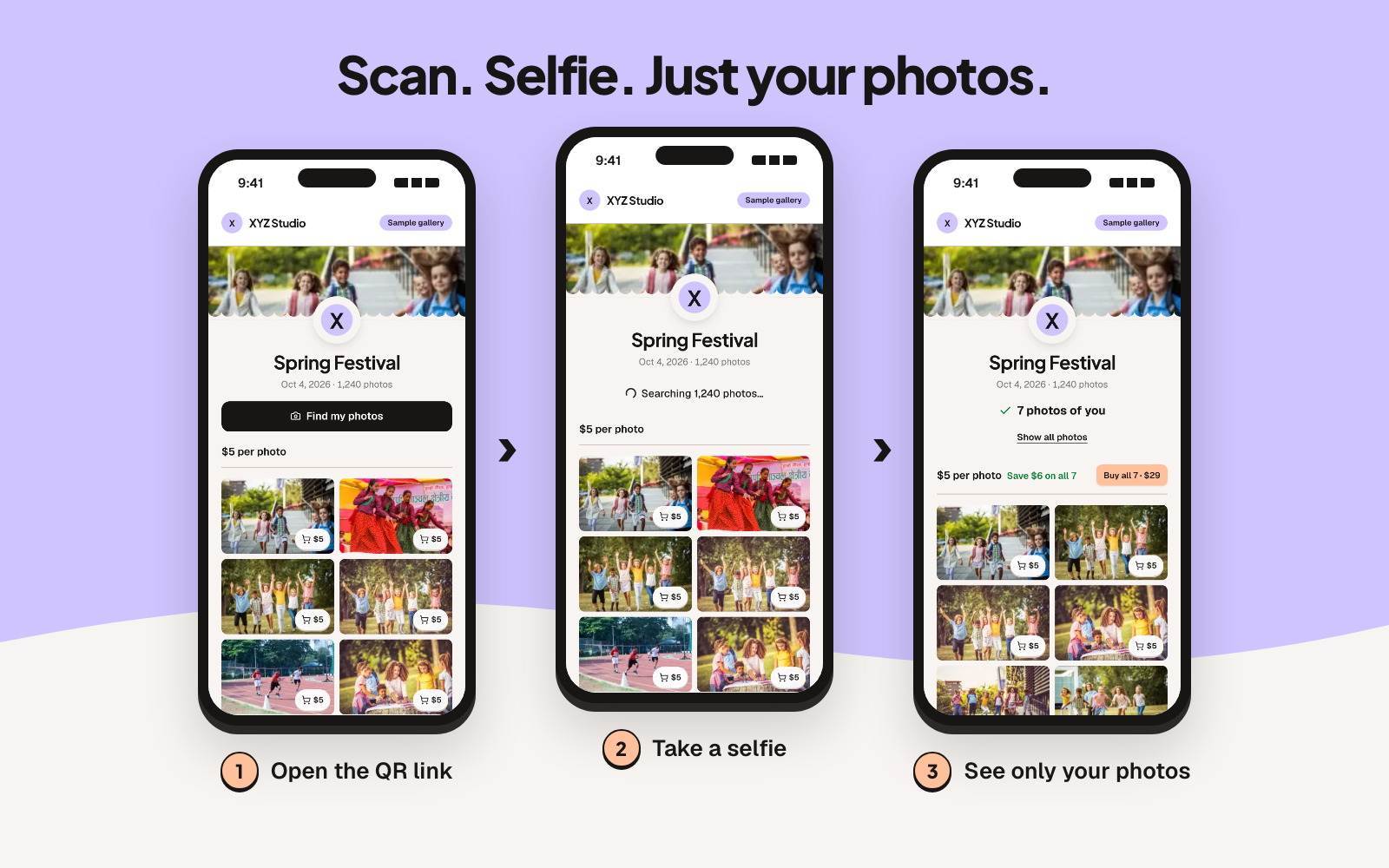
- A QR code is on the stage screen between batches, on the gown-collection desk, and in the convocation booklet.
- The graduate scans it. The gallery opens in the phone's browser. No app, no account to browse.
- They tap Find my photos, agree to a short notice and take a selfie.
- Out of thousands of photos, they see the ones they're in: the stage moment, the group photo with their batch, the shot with their parents by the backdrop.
- They choose single photos or "all my photos", pay the seller directly by UPI, and upload the payment screenshot.
- The seller checks the payment and approves. The full-size originals, without the watermark, are ready to download.
The screenshots above are from the sample gallery: 1,240 photos, one selfie, 7 matches. Try it on your phone; it takes half a minute.
Why this suits convocation in particular
Scale. A convocation can have thousands of graduates and several photographers. Scrolling doesn't work at that size. Face search does: one selfie narrows the gallery to one person.
Timing. Families are on campus for one day. If the photos are online that evening or the next, they share them while the day still matters. A link that turns up months later gets ignored.
Payment. In India, everyone pays by UPI. Graduates pay the seller's UPI ID directly. The platform never touches the money, so there's no commission, no payout delay and no KYC paperwork for the club or the photographer.
Every photo stays protected until it's paid for. Buyers browse watermarked previews only. The originals are released per order, after approval.
Who sells: three set-ups
The platform doesn't split payments between parties, so decide upfront who owns the store.
The college's official photographer sells. The photographer opens a store in their name, shoots the convocation, uploads, and sells. If the college wants a share for a student welfare fund, agree it in writing beforehand. The photographer can export every approved order as a CSV, which makes the settlement simple.
The college sells. The college or its alumni office opens the store and collects into an official account. This suits institutions that already hire photographers on a fixed fee and want the photos to go to graduates at a low price, or free.
The student photography club sells. This is the one I'd suggest for most colleges. More on it below.
Running it as a photography club fundraiser
Most colleges have a photography club with a dozen members, a few good cameras and no budget. Convocation, the annual fest, sports meet and annual day give that club four big shoots a year. Selling those photos can fund new lenses, trips and workshops.
Set it up properly.
- Open the store in the club's name, with the faculty adviser's approval.
- Use the club's or the college's official account for payments, never a member's personal UPI ID. Payment details are free text, so write exactly the account the college has approved.
- Name a treasurer who approves orders and keeps the CSV export for the accounts.
Split the roles on the day.
| Role | Job |
|---|---|
| Stage shooters (2) | One on the degree handover, one on the walk off stage |
| Floor shooters (2-3) | Batch groups, families at the backdrop, candids |
| Data runner (1) | Collects cards between batches, copies them to a laptop |
| Editor and uploader (1-2) | Culls, exports JPEGs, uploads to the event from the venue |
| Treasurer (1) | Approves orders against the club account |
All photos go into one event under the club's store, so the gallery is complete whoever took the shot.
Example pricing. These are example numbers, not a recommendation for your college: ₹100 per photo, ₹299 for "all my photos", and a "whole event" price for departments that want the full set for their archive. Graduates who buy "all my photos" keep getting new matches if more photos of them are uploaded later, so late uploads from a slow card still reach them.
Pick the plan by orders, not by photos. Every approved order counts as one checkout, however many photos are in it. A big convocation with 8,000 photos and 1,500 orders needs the Pro plan (50,000 photos, 2,000 checkouts a year), which also covers the fest and sports meet. A smaller department convocation fits Plus (20,000 photos, 1,000 checkouts).
The convocation-day plan
A week before
- Create the event: "Convocation 2026", date, prices, the club's UPI ID or account.
- Choose who can find it. Unlisted means only people with the link, QR code or event code can open it.
- Set an end date for orders, say three weeks after the ceremony.
- Download the print-ready QR code. Put it on the stage screen's holding slide, a standee at the gown desk, and a page of the convocation booklet.

On the day
- The MC mentions it twice: "Photos will be online tonight. Scan the QR on the screen, take a selfie, find yourself."
- The data runner copies cards between batches so uploads start before the ceremony ends.
- Upload straight from the venue in a browser. Watermarked previews and face search indexing run on their own. Export JPEGs first; RAW files aren't accepted.
That evening and the next day
- Post the link in batch WhatsApp groups and the college's social accounts.
- The treasurer approves orders a few times a day. Buyers get an email at each step, and unpaid orders get reminders before they expire after 14 days.
Fests, sports meets and annual day
The same set-up works for the rest of the college calendar. For a fest, create one event per day or per big show, so the galleries stay focused. For a sports meet, put the QR on the results board. For annual day, put it on the closing slide. One store holds all of them, and the club's yearly plan covers the lot.
Privacy, briefly
Searching is a choice each guest makes: they tap to search and agree to a notice first. Be clear in your notice that, with face search on, every face in the event's previews is indexed so it can be matched, including graduates who never search. The selfie isn't stored; it becomes a face template that's compared only with that event's watermarked previews. Search results last 24 hours. The store can switch face search off for any event, turn on "Live camera only" so searches use the camera rather than a saved photo (a deterrent, not a guarantee), and delete the event's face data once sales close. Anyone can ask for their own face data to be deleted. Check your college's photo policy and the DPDP Act 2023 before you start; this isn't legal advice.
Not just India
Nothing here is India-specific except UPI. US and UK graduations work the same way, with Zelle, Venmo, PayPal or a bank transfer as the payment details. Prices can be set in any of 47 currencies.
Try it before your next convocation
Open the sample gallery on your phone and run a selfie search. If it's what your graduates would want, the plans start at $99 a year with no commission.
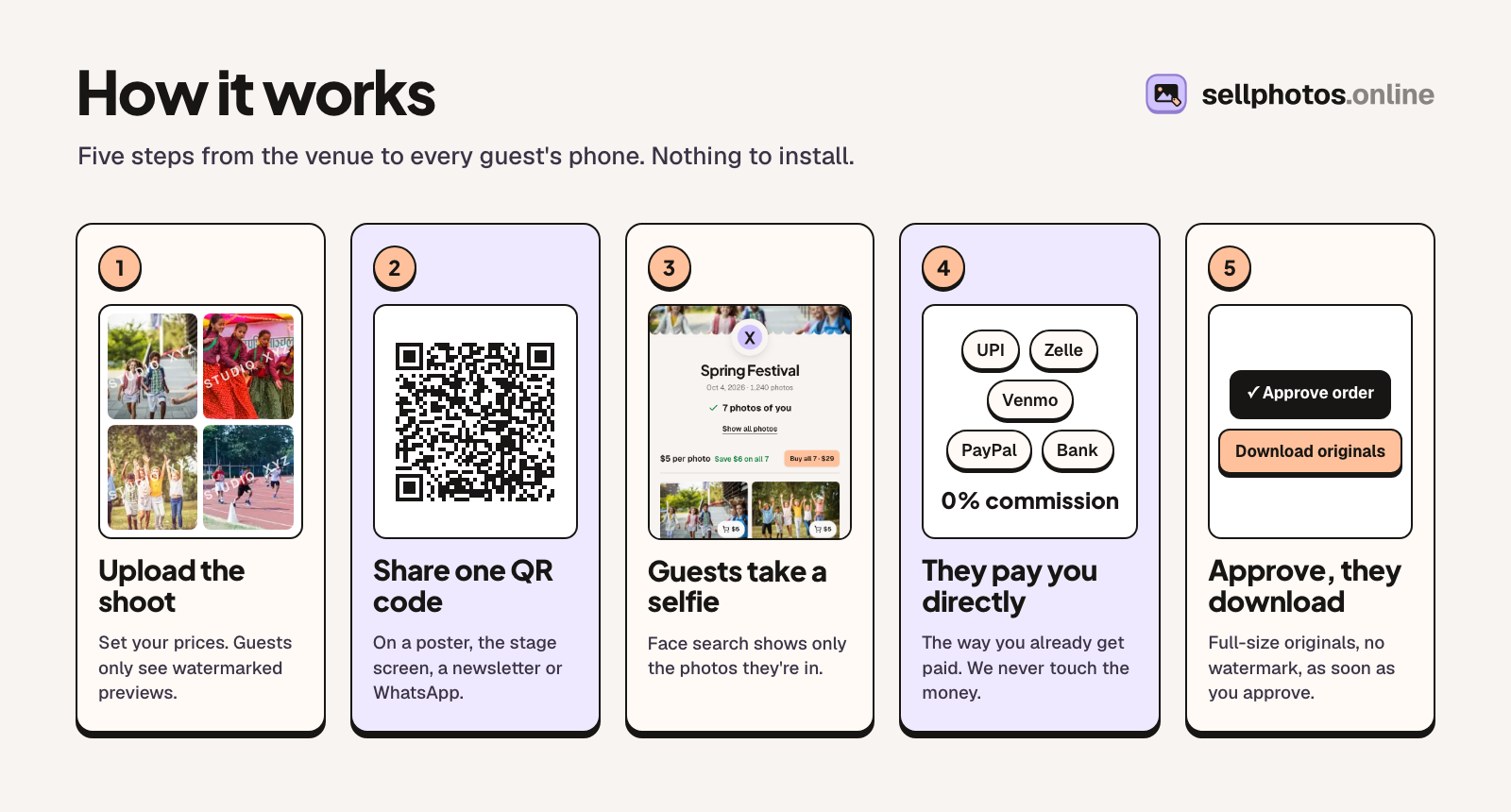
About sellphotos.online. sellphotos.online is an online store for event photos: upload a shoot, share one link or QR code, and guests find their photos with a selfie and pay the photographer directly. There's no commission; stores pay a yearly plan from $99.